
GoSurf (30, 299, 599, 1299, 1999) Promos Globe | Register & Details
GoSURF: GoSURF30, GoSURF299, GoSURF599, GoSURF999, GoSURF1299, GoSURF1999, GoSURF2499
Globe provides GoSurf promos like GoSurf 30, GoSurf 50, GoSurf 99, and GoSurf 299. You will learn how you can register, extend, or stop this promo below. Before processing it you have to proceed with the Globe SIM registration process which is necessary.

GoSURF promos offer affordable data packages with decent internet MBs and GBs for 2 days, 7 days, and 30 days. You can share, watch, and play this promo through Globe services. Let’s read complete details of each promo one by one.
GoSurf Promos Details
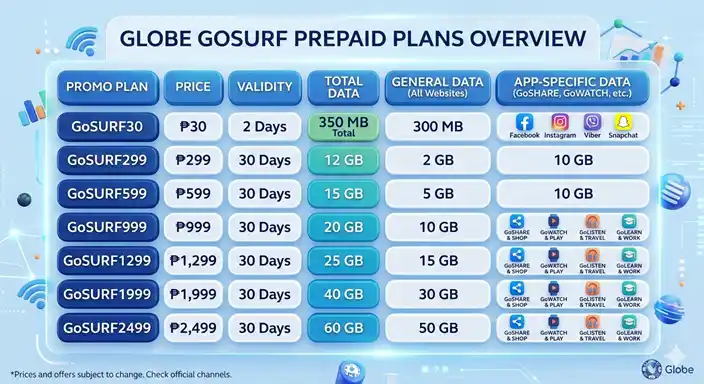
GoSURF30 ₱30
GoSURF299 ₱299
GoSURF599 ₱599
GoSURF999 ₱999
GoSURF1299 ₱1,299
GoSURF1999 ₱1,999
GoSURF2499 ₱2,499
How to Register Go Surf Promos
You can register Go Surf promos using these three methods. To avoid any error please read each step carefully so that you can register your promo in the correct way.
- Using GlobeOne
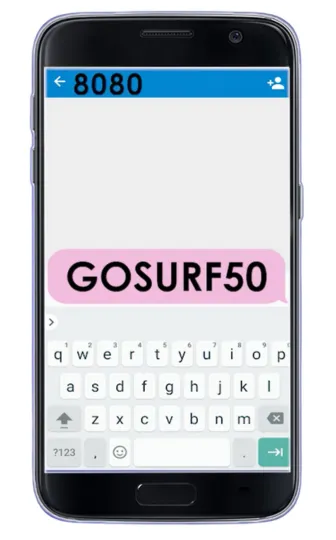
- Through Text
- Dialing USSD Code
Using GlobeOne
Step 1: First of all download and install Globe app through Play Store and App Store using your smartphone.
Step 2: After it, open the GlobeOne and login to the app through your Globe SIM number.
Step 3: Then click on the Buy Promos option and add your Globe number.
Step 4: In the screen you can search your Go Surf promo keyword that you want to register, such as if you want to register Go 99 then you have to search Go 99 in the search bar. In other way you can find your specific promo by scrolling down in the app.
Step 5: And you find your Go Surf promo, click it, then in next screen add your favourite payment method such as G-Cash, credit card or debit card, E-wallet, or pay via bank transfer. You can set Charge to Own Load option. This option will create a way to pay using your GlobeOne app balance and then click on Choose button.
Step 6: After this click on Subscribe button. You will successfully purchase this promo if this message you find on screen is written such as You just bought Go 599 successfully.
Through Text
Dialing USSD Code
This method is more suitable for those who use keypad phones, or if you want to register while having signal problems without using an internet connection. If you are experiencing signal issues in your area and cannot contact Globe customer service, you can easily subscribe to GoSURF through this method by following the steps.
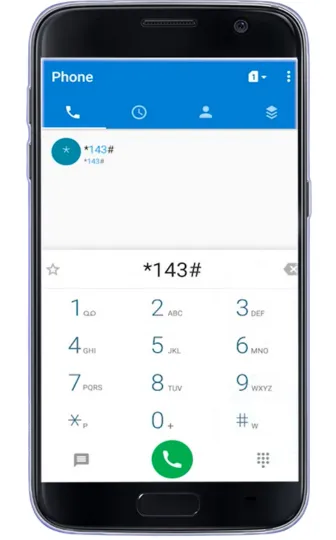
- First of all dial *143# using your Globe SIM number.
- Then enter “5” for selecting surfing option and send.
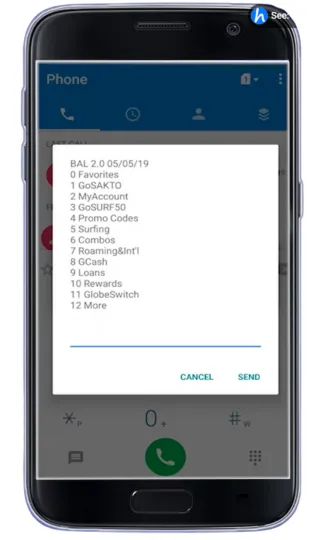
- Enter “1” for choosing “GoSURF” promo and send again.
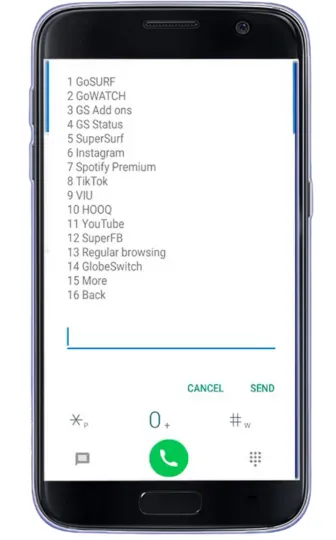
- Then choose any promo you want to subscribe and enter number against it.
- Type “1” for subscribe and hit send button.
- You will receive a confirmation message from Globe Official.
How to Extend GoSurf Promos?
First of all check that your GoSURF promo is still active.
Then make sure you have at least ₱5 load in your SIM balance so check Globe Balance.
Open SMS app in your mobile.
Create a new text and type GS EXTEND.
Send the message to 8080.
Wait for Globe’s confirmation message.
Social Apps You Can Use with GoSURF
With GoSURF and Go promos from Globe Telecom, users can access several popular social media and messaging apps without quickly consuming their main data. These apps are usually included under the GoSHARE category, which is designed for social networking and chatting.
Social Media Apps
You can browse and post on these social platforms:
- TikTok
- X (Twitter)
Messaging Apps
These messaging apps allow you to send messages, share media, and stay connected with friends and family:
- Facebook Messenger
- Viber
Video Apps
- YouTube
- Netflix
- Disney+
- Viu
Learning & Work Apps
- Zoom
- Canva
- Telegram
- Wikipedia
User Questions & Feedback
According to some users, GoSURF data packs feel more expensive compared with older plans. Others say that the GoSURF 30 day promo with 2GB feels too small for the price, and they wish Globe offered more GBs or unlimited app data for longer periods.
Some users also shared that registration can be tricky, with errors appearing even when the promo is visible in the app. Many recommend making sure your balance is enough, updating your SIM, or trying another device to successfully subscribe.
Also try GoULI (Call to all Network). For more details see FAQs section


