How to Share Load in Globe (Updated 2026)
Globe Share-A-Load, also known as the Pasaload service, was discontinued in December 2022. It used to be a text message service that allowed users to transfer load. However, if you want to send Globe load to any of your friends, family members, or anyone in an emergency situation, there are still many ways to send Globe load to others.
These alternatives are simple, safe, and quick. They work for both local and international users. Let’s explore all the methods by which you can share load or send credits to others.
Share Load Using the GlobeOne App
After the discontinuation of the text message service, the GlobeOne app is now the best way to send load to others. Here’s how you can do it:
- Open the GlobeOne app and log in with your Globe number.
- Make sure your Globe SIM is registered.
- Tap the Shop or Buy Load section.
- Enter the recipient’s number and choose the load amount.
- Confirm your payment.

The load will be added instantly to your friend’s or family member’s account. This is a transfer of balance, not a load share, but both work similarly in emergency situations. It means you are purchasing load for someone through the app. Also make sure your globe signals working well.
Share Load Using GCash
If you have the GCash app installed, you can use it just like the GlobeOne app to transfer balance to another person.
- Open the GCash app.
- Tap the Load option.
- Select Mobile, then choose Globe.
- Enter the number you want to send load to.
- Choose the amount, and the load will be sent immediately.
You can also send balance from GCash to other networks such as Globe, TM, and TNT. This service is also known as e load service.
What is Globe AutoloadMax (AMAX)?
AutoloadMax (AMAX) is Globe’s easy way to reload prepaid credits instantly. It’s a secure electronic reloading service that lets retailers send load directly to Globe or TM numbers.
You don’t need to buy physical load cards anymore. Just visit any sari sari store or AMAX ready dealer nearby. Ask them to reload your prepaid number. The load is sent instantly to your phone once the transaction is confirmed. It is also a quick alternative to pass a load

Share Data Instead of Load (Using Promo)
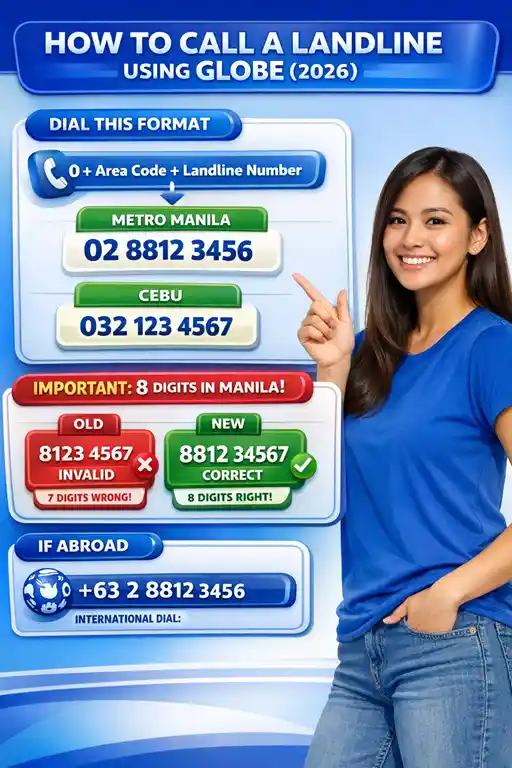
Globe now allows data sharing through group promos like SURF4ALL. You can buy a data pack, such as 20 GB, and share it with up to four users. It’s perfect for families who want to share data instead of load balance. Users can also call landline using globe
Steps to Register
- Open the GlobeOne app and go to the Group Data section.
- Select the SURF4ALL promo from the available options.
- Tap Manage Group Data and add members by typing their names and mobile numbers.
- If you want to control how much data each person uses, set individual data limits for every member.
- Once done, all members will start using the same data pool.
- You can check and manage usage anytime through the app.
Other Mobile App Services for Globe Load Share
You can use following apps for globe load
- CLIQQ App
- Lazada App
- Shopee App
- Coins.ph App
- BPI App
- Puregold Mobile App
Load via CLiQQ App
- Download the CLiQQ app from Google Play or the App Store. Open the app and tap Buy Load.
- Choose Globe and select the load amount. Enter your mobile number and confirm.
- Show the barcode to the cashier and pay. You’ll get a text message once your transaction is confirmed.
via Lazada App
- Download the Lazada app from Google Play or the App Store. Log in and go to Load, Bills & Coupon.
- Tap Mobile Load. Enter your prepaid mobile number and choose the load amount.
- Select your payment option and press Pay Now.
via Shopee App
- Download the Shopee app from Google Play or the App Store.
- Log in and tap Buy Load on the main page. Choose Mobile Load and Data, then tap Mobile Load.
- Enter your prepaid number and select your desired amount.
- Pick your payment method and tap Pay Now to finish.
Load via Coins.ph App
- Open coins.ph app and tap Buy Load.
- Enter the mobile number you want to load.
- Slide to pay and complete your transaction.
Load via BPI App
- Log in to BPI app with your username and password.
- Tap Menu, go to Payments/Load, and select Load Prepaid Phone. Fill in the number and amount, then tap Next.
- Review the details and confirm. Enter the 6-digit One-Time PIN sent to your phone.
- You’ll receive a confirmation once the transaction is complete.
Load via Puregold Mobile App
- Download the Puregold Mobile app from Google Play or the App Store.
- Open the Puregold Mobile app and tap Buy Load.
- Enter your mobile number.
- Choose between Regular, Mobile Data, or Commercial (Super Suki SIM).
- Enter or select the load amount and tap Next.
- Select your payment method and tap Pay Now to complete.
Call Cards
You can reload your Globe Prepaid using call cards. Its available at any Globe Business Center or authorized retail outlet in phillippines. Choose your preferred card amount like ₱100, ₱300, or ₱500.
- Lightly scratch the gray panel to reveal your card and PIN numbers.
- Dial 223 and press SEND.
- Enter the card number and press #.
- Enter the PIN and press #.
- A voice prompt will confirm your successful reload.
Use Banks
Globe Prepaid and TM users can reload anytime through ATM, online, mobile, or phone banking. Partner banks include: BPI, BDO, Citibank, BancNet, Metrobank, and China Bank.
Use E PINs
E-PINs work like call or text cards but are provided through secure paper slips or SMS. Each E-PIN has a unique card number and PIN.
You can get Epin from:
- Text-A-PIN from RCPI outlets.
- Paper Slip E-PINs from 7-Eleven, Eunilaine Supermarkets, and RCPI outlets.
Steps to load via E Pin
- Dial 223 and press SEND.
- Enter the card number and press #.
- Enter the PIN and press #. Voice prompt will confirm your successful reload.